|
|

|
|
 |
Send an receive mail with IBM i
(AS/400, iSeries, System i, ...) |
| V5R3, V5R4, V5R5, V6R1, V7R1, V7R2, V7R3, V7R4, and ... more to come |
|
|
A public-source utility authored by Giovanni B. Perotti, Italy.
The contents of these pages are related to the release dated January 9, 2024.
1. Prerequisites, installation, contents, distribution, updates
Prerequisites
- Installers must have a general knowledge of TCP/IP servers involved in IBM System i electronic-mail support.
Information can be found in Redbook AS/400 Electronic-Mail Capabilities.
- Minimum required operating sisystem release V5R3.
- RPG-ILE compiler (just for the installation)
- Library QHTTPSVR (product 57xxDG1)
- Library QFNTCPL
(AFP Compatibility Fonts, product 57xxSS1, option 8, feature 5050)
required for conversion of spool files to PDF's.
- Library QCTX (AFP to PDF transform, product 5761TS1 options *BASE and 01)
required starting V6R1 for using the "i5 OS AFP TO PDF TRANSFORM",
see this page.
- If you want to send SMS via Clickatell remote server, the following is needed:
- at least operating system release V5R4
- Scott Klement's library LIBHTTP with service programs HTTPAPIR4 and XPAT.
- SSL services must be active.
- System value QCCSID 65535 is not recommended.
Job CCSID 65535 inhibits automated character conversion from one CCSID to another CCSID.
Automated EBCDIC to ASCII character conversion is used in many MMAIL commands and functions.
This is why MMAIL commands and functions, whenever running in a job with CCSID 65535, try to change the job CCSID to the job default CCSID.
However, to perform a CHGJOB command, the job user profile must have job control (*JOBCTL) special authority.
This means that user profiles missing *JOBCTL special authority may face severe problems running MMAIL commands or functions.
Please also note that MFS jobs must not run with CCSID 65535.
See the following FAQ for a way to overcome this problem.
- System value QRETSVRSEC.
Access to the webmail application AMailer is through validation lists.
If you plan to use this webmail application, then you must set system value QRETSVRSEC to 1.
Installation
- The installation instructions are available in the MMAILMAINT.txt file when you unzip the downloaded file mmailMaint.zip.
- Please also read the topic MMAIL update dependencies.
- The installation process is designed to perform both MMAIL library initial installation and subsequent updates.
- Specifically, the update process is carried out directly on the existing MMAIL library, in order not to stop ongoing production jobs.
- This is how the installation process works:
- If no MMAIL library already existing, it is created.
- MMAIL library is populated with non-source-file objects:
- existing data areas referring to previous MMAIL installation user options are not updated
- all the other non-source-file objects are replaced by new versions.
- Source files are completely replaced.
- MMAIL service programs, modules, programs, commands and panel groups are completely recreated
- Local installation data documented in a separate library (MMAILDATA)
- IFS directory /mmail is restored
- Libraries HPT and TIFFLIB (used by command MMAIL/CVTSPLFPDF, Convert Spool File to PDF) are restored
- User is asked to define the preferred MMAIL default values through a number of commands.
These commands can be run at any time to change MMAIL default values:
- SETCONFID
- to define the Company-Confidential statement
- CVTTOPDF
- to select the default spool file-to-pdf conversion utility
- EMLDFTBODY
- to define the default text to be used for a message body of an e-mail message when no text is provided for it
- CHARSET
- to select the default character set
- NOSUBJECT
- to define the default subject when no subject is provided in an e-mail message
- DSPF STMF('/mmail/conf/httpd.conf')
- to display the HTTP directives for a HHTP instance related to the MMAIL manual
Contents
- MMAIL is the base library.
Two more libraries
(HPT and
TIFFLIB) are available.
These libraries support the conversion of a spool file to a pdf.
While library HPT is installed if the OS/400 release is at least V4R5,
library TIFFLIB is installed only if the OS/400 release is at least V5R1.
- Service program mmail/sendmail
is the base for all e-mail services provided. The functions of this
service program are used in many utilities available in the package,
are documented in a separate page
and are available for your own developments.
- Service program mmail/gpsrvpgm
is a duplicate of service program cgidev2/cgisrvpgm2.
To develop ILE-RPG CGI programs providing e-mail services
- include binding instructions via
/copy mmail/qrpglesrc,hspecsbnd
- include CGISRVPGM2 prototypes with a
/copy mmail/qrpglesrc,prototypeb
- include SENDMAIL prototypes with a
/copy mmail/qrpglesrc,mailproto
- A general 5250 utility can be run via command
mmail/mimemenu. It allows to:
- maintain an address book
- maintain groups (distribution lists)
- create a MIME message (some times also called "MIME file")
- send a MIME message
- maintain a catalog of existing MIME messages
The functions of this utility are documented on
separate pages.
They provide very good examples of interfacing the base
service program.
- A similar, very friendly utility is also available
for Windows. This Client/Server utility requires Client Access
Express and operates via service program
mmail/wsendmail.
It is documented on a
separate page.
- A number of other commands are available through menu
go mmail/mail. See
this page
for details.
These commands can be easily
used in your application programs. They allow to:
- e-mail a simple message
- e-mail a source member
- e-mail a spool file
- e-mail a save file
- another utility allows to capture given spool files
from one (or more than one) output queues and to e-mail
them to different distribution lists (groups).
Note 1- All functions supporting e-mailing of spool files
include the ability to convert spool files to PDFs.
Note 2- The base service program includes the ability to
customize messages by assigning values to user-provided variables. See
procedure
MimeVarTxt.
Note 3- All IBM System i programs and service programs are implemented either in ILE-RPG or CL.
All sources are delivered. If you need to apply changes to
a service program, you should run command
mmail/compile after applying changes.
Sources are also available for the Windows Client/Server utility.
Distribution
- Library MMAIL can be downloaded from the Easy400 site.
MMAIL updates
- Whenever updates are necessary a new MMAIL version is released.
Each MMAIL version has its own release date.
- The current MMAIL version available is dated January 9, 2024
- To know the release date of the MMAIL version currently installed on your system,
enter command MMAIL/RELEASED .
- A list of changes in maintained in member MMAIL of source file MMAIL/WHATSNEW.
Press here
to display the latest changes.
MMAIL update dependencies
Some releases of MMAIL may include new subprocedures for service program MMAIL/SENDMAIL.
Since April 1, 2009 service program MMAIL/SENDMAIL has a zero signature.
If you already have installed MMAIL and you are going to install a new release of it,
you should first check the release date of the existing MMAIL. You do that by running command
MMAIL/RELEASED.
- If the existing MMAIL carries a release date equal to or higher than April 1, 2009,
your CGI programs bounded to service program SENDMAIL will have no problem with the new MMAIL release,
as there will be no signature check with the new service program MMAIL/SENDMAIL.
- If you have a MMAIL version released prior to April 1, 2009 , after installing the new version of MMAIL
you must run command
MMAIL/REBIND library_name
for each library containing programs bound to service program MMAIL/SENDMAIL.
Command MMAIL/REBIND rebinds all service programs and CLLE/RPGLE programs in the user specified library.
- If you duplicated service program MMAIL/SENDMAIL to several program libraries (to make them
independent from service program MMAIL/SENDMAIL, and be free to update library MMAIL in any moment),
and you want to replace some of those duplicated SENDMAIL service programs with a more recent version
available from library MMAIL, then you may use command
MMAIL/DUPSRVPGM.
This command:
- retrieves the libraries containing service program SENDMAIL
- lets you select the libraries to be processed
- for each selected library
- replaces service program SENDMAIL in that library with a copy of service program MMAIL/SENDMAIL
- rebinds all service programs of that library
- rebinds all CLLE and RPGLE programs in that library.
2. Objectives & Restrictions
- By using MMAIL you will be able to
- Create MIME files embedding texts and images, and appending
various type of attachments (source members, spool files, images, audios, videos, and
any other type of binary objects, for instance
OS/400 save files)
- Send MIME files to addresses selected from an Address Book,
and/or to selected Groups (distribution lists)
After reading our service programs functions, you will be able to
- write your own ILE-RPG programs to handle outgoing mail messages
- write your own ILE-RPG programs to send out customized messages
- File systems restrictions
MMAIL is just able to process objects residing in the "root" of the
Integrated File system (IFS).
Objects residing in other file systems (such as QDLS, QNCT, etc) cannot be processed by MMAIL.
3. MIME files
Multipurpose Internet Mail Extensions
are a set of standards defining a message representation protocol.
These standards have grown up since 1982 through a number of RFC's
(Request for Comments). Two major of them are listed here:
In brief, usually a MIME document is made of:
- A number of top headers describing sender, date, MIME version,
distribution, subject,
importance, priority, and sensitivity of the document:
Sender: as400man@chris.com
Date: Wed, 09 Oct 2002 19:08:25 +0100
From: Mike Shumaker <as400man@chris.com>
MIME-Version: 1.0
To: Sergei Bertolds <sergiob@argo.com>
Subject: Some examples
Importance: medium
Priority: normal
Sensitivity: normal
|
- A Content-type header describing the
document as MULTIPART/MIXED.
This means that the document may contain more than one piece
(for instance some text and an attachment) and that the single
pieces may have different types.
The same header contains another keyword,
BOUNDARY; it defines the boundary line
that will be used to separate the single pieces.
|
Content-Type: MULTIPART/MIXED; BOUNDARY="--PART.BOUNDARY.1"
|
- The body of the message, usually some text, between boundaries
and preceeded by appropriate
Content-Type and
Content-Disposition headers:
----PART.BOUNDARY.1
Content-Type: text/plain; charset=US-ASCII
Content-Disposition: inline
Hello Sergei
please find attached the example we were discussing
today.
Kind regards,
Mike
|
- One or more attachments, as follow:
----PART.BOUNDARY.1
Content-Type: application/octet-stream; name="example.exe"
Content-Disposition: attachment; filename="example.exe"
Content-Transfer-Encoding: base64
Content-Description: example.exe
(copy of the binary object translated to Base64 format)
|
Note 1.
"Base64" is a standard way of embedding binary objects into ASCII
MIME files. This is done by translating chunkes of 3-EBCDIC bytes
to chunkes of 4-ASCII bytes. Our utility includes a function
that performs this kind of translation.
4. QtmmSendMail API
In MAIL the MIME files are sent via the QtmmSendMail
API. This API allows for multiple distributions.
API QtmmSendMail is served by
- MSF (Mail Server Framework), started/ended by commands STRMSF / ENDMSF
- SMTP (Simple Mail Transfer Protocol), started/ended by commands STRTCPSVR *SMTP / ENDTCPSVR *SMTP
For more information see
this page.
5. MIME & Mail 5250 Utility
Use this utility to become familiar with the way MIME files are built and subsequently sent through API QtmmSendMail.
- Once you feel confident in your understanding, we suggest that you start using the MMAIL tools listed in Main Utilities,
better suited for your developments.
- You can then go a step further, by using - in your ILE-RPG programs - the procedures of the MMAIL Service Program.
To start the MIME & Mail 5250 Utility, enter command
mmail/mimemenu
You will receive the following screen:
|
MIME files Menu |
|
Select one of the following:
|
|
1. Work with Address Book |
WRKADDR |
|
2. Work with Groups |
WRKGRP |
| |
|
3. Create (and send) a MIME file |
CRTMIME |
|
4. Select and send a MIME file |
SNDMIME |
|
5. Work with MIME files |
WRKMIME |
| |
|
6. Example of customized letters |
CUSTMAIL |
|
Selection:
|
|
F3=End F12=Cancel
|
|
See the 5250 Utility tutorial pages.
6. MIME & Mail Windows Utility
A similar utility is provided for Windows.
Through Client Access Express API's it would communicate with an IBM System i
service program to provide similar services.
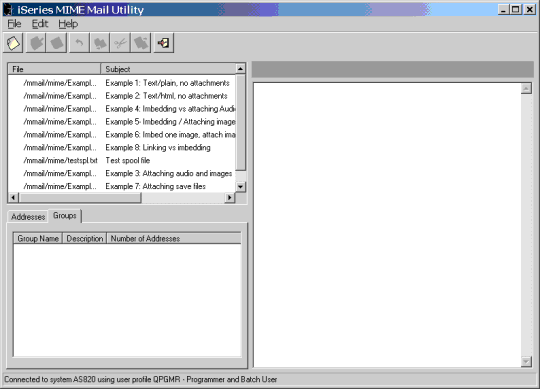
See the Windows Utility tutorial page.
7. MIME & Mail Main utilities
Service program MMAIL/SENDMAIL
allows to create your own mail utilities in a very easy way.
However, it may happen that some interesting mail utility is suggested
from our users. Any such utilities are embedded in library
MMAIL and documented in page
"Main utilities".
8. Spool file to PDF conversion tools
Conversion of spool files to PDF is not in the scope of MMAIL.
However, as the user need to e-mail messages attaching printouts as PDF's is very common,
a number of conversion tools have been integrated/interfaced by MMAIL.
- We have integrated two open-source freewares taken from the Internet,
CVTSPLHTMF (*SCS only) and CVTSPLFPDF (*SCS and *AFPDS).
These utilities, however, may have problems in using overlays.
- An extremely powerfull utility interfaced by MMAIL is iPDF (*SCS only), an open source product by Orati-Systems.
It has an incredible number of features, but you can easily use it also for very simple PDF's.
- Last, MMAIL interfaces two classic fee products, IBM Infoprint Server and AFPTOOL by Bradley V. Stone.
They both support *SCS and *AFPDS spool files.
For more information about using these tools with MMAIL, please refer to this page.
9. SendMail service program
To make our utility easy to read and to maintain, we have
isolated a lot of functions into the
MMAIL/SENDMAIL service program.
These functions are the ones you need in order to write
your own mail-management programs.
See the SendMail service program page.
10. Commands
Library mmail contains several commands. A
separate page provides a quick summary of all available
user commands.
11. Duplicating a MMAIL installation to other systems
Once you have installed MMAIL on your IBM System i (equipped with the RPG-ILE compiler),
you may duplicate the installation to other IBM System i's, even if they are missing the RPG-ILE compiler.
This is how you do it:
- The source system (the system where MMAIL was originally installed) and the target system (the system where MMAIL is to be installed)
must have the same system value QCCSID
- On the source system:
- save library MMAIL
- On the target system:
- logon with a user profile having USRCLS(*SECOFR)
- restore library MMAIL
- run command "mmail/install"
12. Multiple MMAIL libraries
In order not to impact production jobs when you install a new MMAIL release, you can duplicate the MMAIL library to a differently named library
and have this duplicated library serving your production jobs.
See How to handle multiple MMAIL libraries.
13. Development libraries
Never create local objects (program, files, etc.) in library MMAIL,
because you would loose them when installing a new release of library MMAIL.
If you plan to develop programs using subprocedures of MMAIL service programs,
you are recomended to:
- Create your own development library, do not use library MMAIL.
- Optionally you may populate your development library with the objects you need to develop MMAIL-based programs:
- Use command MMAIL/SETMAILLIB to populate your library with duplicates of MMAIL service programs, binding directories and QRPGLESRC /COPY members
- When you create and run your programs, make sure that they refer to the service programs in your library, not to the service programs in library MMAIL.
You do that by removing MMAIL from the library list, and adding your library instead.
14. Troubleshooting and FAQs
Some troubleshooting FAQs are available at our
FAQ page.
15. WEBMail
MMail includes a public-source WEBMail utility, named AMailer.
It is an IBM System i WEB Mailer which (like many commercial mailers for PC)
allows to receive and send e-mail messages.
AMailer supports multiple users and is fully integrated with MMail.
AMailer includes a facility to let you receive and process your own way on the System i the incoming mail of given mail accounts,
see this page.
An AMailer tutorial is available.
16. Uninstalling MMAIL
To uninstall MMAIL execute the following commands:
- endtcpsvr *HTTP httpsvr(MMAIL)
- CHGJOBD JOBD(QHTTPSVR/QZHBHTTP) INLLIBL(QGPL QTEMP) LOG(4 0 *SECLVL)
- DLTLIB LIB(MMAIL)
- DLTLIB LIB(MMAILDATA)
- RD DIR('/mmail') SUBTREE(*ALL)
- RD DIR('/mmaildata') SUBTREE(*ALL)
- RD DIR('/amailer') SUBTREE(*ALL)
|
|
|
