1. Securing TELNET
- Signon to System i with the user profile owning SECTCP
- From the screen in Figure 1 take option 3 (Secure TELNET).
You will be displayed the following screen:
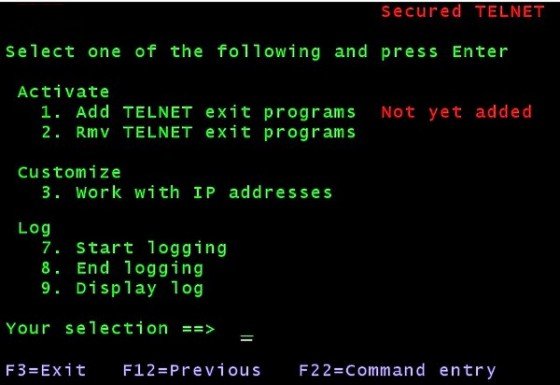 |
| Figure 18 - Adding the FTP exit programs |
- Take option 3 (Work with IP addresses) and make sure to have defined an *ANY entry,
as it is shown in the following image:
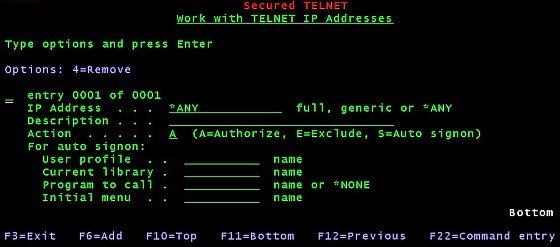 |
| Figure 19 - Enabling all IP addresses to TELNET |
By doing this, you enable whatever client IP address to initiate a TELNET session.
Keep it this way for the time being, and go to the next step.
- Go back (F12) to the screen in Figure18
and select option 1 to add the SECTCP exit point to the TELNET server. That would be immediate, but would not have any effect
until you restart the TELNET server.
- Next, from the same screen take option 7 to start logging.
- Last, schedule a TELNET server restart.
Note. To disinstall the SECTCP exit point for TELNET, use option 2 from the screen in Figure18.
Also in this case, you will have to schedule a TELNET server restart.
|

Restricting the access to TELNET
The *ANY entry in the list of TELNET IP addresses allows any client IP address to login.
Let us suppose instead that you would like to restrict the access to:
- the local terminals having IP addresses starting by 192.168.0.
- to a remote client having IP address 81.208.31.214
This is how you do it.
- Go to the screen in Figure19 and press F6 to add the following entry:
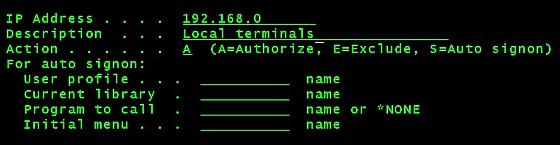 |
| Figure 20 - Adding an entry with a generic IP address |
- press the Enter key to add this entry, then do the same (F6 again) to add the second entry:
 |
| Figure 21 - Adding an entry with a specific IP address |
- last, rollback to the *ANY entry and use option 4 to remove it.
You do not need to restart TELNET. Any time you add, change or remove an IP address entry, this is immediately understood
by the SECTCP exit program.
More things that you can do:
- You may add IP address entries to Exclude clients
- You may add IP address entries for AutoSignon to force the initial signon with a given user profile (some
mandatory parameters must be entered). Please note that when an Autosignon user signs off, would then receive the standard
signon screen.
Limitations:
It must be understood that the TELNET "session initiation" exit program receives control just before that the client is assigned a device.
A few input variables are available at that moment and the most important is the client IP address. The only actions allowed are to reject the connection,
to accept the connection, and optionally to force an Auto-signon.
From that point on this Telnet exit program does not receive any longer control from the terminal session. In other words,
it is not known anything about the signon performed, the actions performed during the session, the time when the user signed off,
the following signons, the session drop out, and so on. Therefore there isn't much to report in a log.
Second level exit point:
Our TELNET "session initiation" exit program in turn provides the option to call a user-defined exit point program.
This user program receives some of the information available and can override the session decisions taken by our "session initiation" exit program.
More on this subject ...
|
