LoginOut provides an application-based (as opposed to an HTTP-based) solution
for web login and logout. The sources and the executable code
needed to implement this approach are in library LOGINOUT. The code is made of:
- a validation list maintenance utility (CGI program WRKVLDL)
- a validation list (LOGINOUT)
- three sample programs (CGI programs SAMPLEPGM1, SAMPLEPGM2 and SAMPLEPGM3)
- a service program (LOGINOUT)
The approach relies on a validation list and a cookie.
- Validation list
The server must be able to validate authorized users.
Some file containing information about authorized users should be made available.
Why not using a validation list for that? Validation lists are the perfect object type for such a duty:
- rather compact objects
- provide high performance access
- cannot be accessed with traditional tools/utilities/comands
Of course, you need a program to maintain validation list entries.
This is CGI program WRKVLDL in library LOGINOUT.
See page Defining users to know how to use it it.
- Cookies
Non-persistent CGI programs are stateless (they do no retain a reliable memory after processing a user transaction).
Therefore, every time a non-persistent CGI is called, it must perform user validation again.
In other words, something external to the CGI must provide every time an user identification.
The application driven technique for this is to give the client - as soon as the user logs in -
an "identification-ticket" to the client. From this moment on, any time the client calls a CGI,
the CGI can ask for the ticket and perform user validation.
To support a ticket strategy, nothing is better than a cookie. Cookies are data areas on the PC. All cookies referring to a given server are returned in a single
environment variable at any CGI transaction. This is why CGIDEV2 service program can easily retrieve a cookie of your choice.
The identification stored in the cookie is made of the username and of the password. The CGI, after retrieving the cookie, will have to
validate this identification versus the validation list (don't worry, we provide functions in a service program to perform such duties).
The debatable question is "how long a cookie should lasten".
We have decided for a temporary and expirable cookie.
A temporary and expirable cookie is a cookie that expires either
- after a given elapsed time (our default is 15 minutes), OR
- when the user logs out from an application, OR
- when the user closes all the browser windows.
Once the cookie has expired, one must login again to enter the application.
A sample walk through
Library LOGINOUT contains a prototype CGI application that you may adopt in developing your own CGI applications (see page "Application development").
To make it work, you should first add at least an user of your choice (user name and password) to validation list LOGINOUT/LOGINOUT.
See page "Defining users".
Let us have a walk through this prototype.
The prototype is made of three ILE-RPG CGI programs (powered by service programs CGIDEV2 and LOGINOUT): programs SAMPLEPGM1, SAMPLEPGM2 and SAMPLEPGM3.
- The login program
This is program http://.../loginoutp/samplepgm1.pgm
This is how this program works:
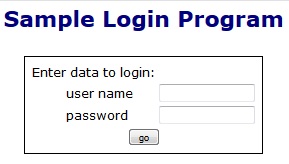
- Ask for login
| When no input variables received, the program sends out a login form (Figure 1)
|
|
|
| Figure 1 - Request to log in |
|
- Perform the login
If the program receives the login request, it
- validates the login data versus the validation list
(if the validation fails, it issues again the request to login with some error message)
- sends out an html page which
- donates the temporary cookie to the client
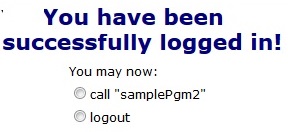
- Issues the first application screen (See Figure 1b)
|
| Figure 1b - First application screen |
- The next page program
This is program http://.../loginoutp/samplepag2.pgm
Either you invoke it with the above URL, or you invoke it by pressing the appropriate radio button in Figure 1b.
This is how this program works:
- Expiration check
The program tries to get the cookie from the client. If the cookie did expire, the program would go back to the login screen (Figure 1).
- User validation
If the cookie is still there, the program receives user name and password from the cookie,
and validates this identification against the validation list.
If the validation fails, the program goes back to the login screen (Figure 1).
- Cookie refresh
The program refreshed the client cookie with a new expiration timestamp.
- Perform application logic
This is what a real life application program should do.
In this example, the only application logic is to present a small menu.
- Send out the reponse html page
The contents of the page depend on the application.
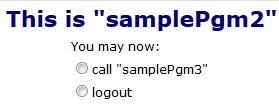
All application pages should however feature a logout button:
see Figure 2.
|
| Figure 2 - An application page |
The logout button sends a special request for program SAMPLEPAG1.
This program will send out an html page that:
- makes the cookie expire
- sends a a request for program SAMPLEPAG1 (no input variables provided).
As a consequence, the login page (Figure 1) appears.
- Auto expiration
If a WEB page sits on the screen for more than 15 minutes, the next requested program finds that the cookie has expired
and the login screen (Figure 1) is shown instead.
|