The session login/logout prototypes available in library LOGINOUT can be used in CGI applications of your own.
However, you must not try to customize to your needs the contents of library LOGINOUT.
Never change the contents of library LOGINOUT (unless you need to install a refresh of this library).
Library LOGINOUT provides command SETLIB for populating your development libraries with the appropriate tools.
Topics in this page
1. Command LOGINOUT/SETLIB
2. Command object_library/HTTPCFG
3. Maintaining the validation list object_library/LOGINOUT
4. Developing the session logon CGI program
5. Developing other CGI programs
6. Other vital requirements

1. Command LOGINOUT/SETLIB
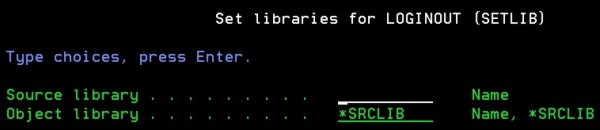
Use this command to populate your development libraries with the tools available from library LOGINOUT:
Figure D1 - Command LOGINOUT/SETLIB
- Source library
This must be the name of your application development library containing the source files
(for instance QCLSRC, QRPGLESRC, etc.).
- Object library
This is the name of your application library containing the executable objects
(programs, data areas, etc.).
Note 1. If the application is made of just one library containing both the source files and the executable objects,
enter its name in the first parameter and leave *SRCLIB in the second parameter.
Note 2. The libraries mentioned in this command may not yet exist. If they are not found, they are automatically created.
Note 3. In case some of the generated objects is accidentally deleted, you may rerun this command. Only the missing objects
will be regenerated.
The following objects are generated in the source library:
| Object | Type | Attribute |
| QRPGLESRC | *FILE | PF |
| LOGINOUT | *BNDDIR | |
Figure D2 - Objects generated in the source library
The following members are generated in source file QRPGLESRC of the source library:
| Member | Type | Text |
| HSPECS | RPGLE | /copy: H specifications |
| HSPECSBND | RPGLE | /copy: H specification for binding directories |
| HTTPCFG | RPGLE | Add HTTP directives |
| SAMPLEPGM1 | RPGLE | CGI- Sample login program |
| SAMPLEPGM2 | RPGLE | CGI- Sample program 2 |
| SAMPLEPGM3 | RPGLE | CGI- Sample program 3 |
| WRKVLDL | RPGLE | CGI- Maintain validation list LOGINOUT |
| XPROTOTYPE | RPGLE | SRVPGM- Subprocedure prototypes |
Figure D3 - Members added to source file QRPGLESRC in the source library
The following objects are generated in the object library:
| Object | Type | Attribute | Description |
| HTTPCFG | *PGM | RPGLE | Add HTTP directives |
| SAMPLEPGM1 | *PGM | RPGLE | CGI- Sample login program |
| SAMPLEPGM2 | *PGM | RPGLE | CGI- Sample program 2 |
| SAMPLEPGM3 | *PGM | RPGLE | CGI- Sample program 3 |
| WRKVLDL | *PGM | RPGLE | CGI- Maintain validation list |
| LOGINOUT | *SRVPGM | | |
| LOGINOUT | *VLDL | | |
| APACHECONF | *FILE | PF | |
| HTTPCFG | *FILE | DSPF | Install HTTP configuration |
| MBRLIST | *FILE | PF | Output file for DSPFD TYPE(*MBRLIST) |
| QATMHINSTC | *FILE | PF | CUSTOMER Instance physical file |
| QATMHTTPC | *FILE | PF | HTTP SERVER CONFIGURATION |
| HTTPCFG | *CMD | | Add HTTP directives |
Figure D4 - Objects generated in the object library
An IFS directory with the same name as the object library is generated:
| Directory . . . . : /object_library |
| css | DIR |
| graphics | DIR |
| html | DIR |
|
| Directory . . . . : /object_library/html |
| sampleExpired.txt | STMF |
| sampleLoggedout.txt | STMF |
| samplePag1.txt | STMF |
| samplePag2.txt | STMF |
| wrkvldl.htm | STMF |
|
Figure D5 - Generated IFS directory and subdirectories
SOME REMARKS ON THE GENERATED OBJECTS
- service programs
A service program is duplicated to the object library:
- LOGINOUT
This is the service program for the LogInOut session approach documented in a separate page.
It contains subprocedures supporting the LogInOut session approach.
Binding directory LOGINOUT in the source library (see Figure D2) contains entries for both this service program
and CGIDEV2/CGISRVPGM2, and is mentioned in /COPY member HBND_LIO of QRPGLESRC.
- Generated IFS directory and subdirectories (see Figure D5)
Stream files in subdirectories /.../html and /.../css are related to the external HTML
for the object_library CGI programs WRKVLDL, SAMPLEPGM1, SAMPLEPGM2 and SAMPLEPGM3.
- HTTP directives
HTTP directives allowing execution of the object_library CGI programs are available in files
QATMHTTPC ("Original" HTTP) and APACHECONF ("Apache" HTTP) of the object_library.
These HTTP directives are installed through command object_library/HTTPCFG.
- /COPY statements for CGI programs
A number of source members in QRPGLESRC ((see Figure D3) must be included in ILE-RPG CGI programs to enable use of subprocedures
from service programs CGIDEV2/CGISRVPGM2 and user_object_library/LOGINOUT:
/copy user_source_library/qrpglesrc,H_LIO
/copy user_source_library/qrpglesrc,HBND_LIO
... File spec.s ...
/copy CGIDEV2/qrpglesrc,prototypeb
/copy user_source_library/qrpglesrc,xprototype
/copy user_source_library/qrpglesrc,usec
/copy user_source_library/qrpglesrc,variables3
|
Figure D6 - /COPY statements in ILE-RPG CGI program sources
(replace "user_source_library" with the actual name of your source library)
|
2. Command object_library/HTTPCFG
Command object_library/HTTPCFG (generated in your application object library by command LOGINOUT/SETLIB)
provides a convenient way for installing the HTTP directives needed to run the CGI programs in your object_library.
Enter this command from a green-screen workstation.
- If your OS release is before V5R3, you are asked to choose between Original and Apache directives.
If your OS release is after V5R2, you have no choice, as only Apache directives are accepted, and you come directly to step ii).
- You receive a list of the available HTTP instances.
You must select the HTTP instance to be added the new HTTP directives.
Before making the choice, make sure that the user profile you are using is authorized to change the related HTTP configuration file.
If you take chances, you may receive a message telling that you are not authorized to.
- The update of the configuration file takes place. Following this, you are displayed the updated HTTP instance configuration file.
If the result looks correct, then you may restart the HTTP instance.
See the following example of HTTP directives added for user library MYLIB:
#----        MYLIB directives
ScriptAliasMatch /mylibp/(.*)  /qsys.lib/mylib.lib/$1
Alias /mylib/ /mylib/
<Directory /mylib>
   AllowOverride None
   Options None
   order allow,deny
   allow from all
</Directory>
<Directory /QSYS.LIB/MYLIB.LIB>
   Options +ExecCGI
   CgiConvMode %%EBCDIC/EBCDIC%%
   AllowOverride None
   Options None
   order allow,deny
   allow from all
</Directory>
 <LocationMatch ^/mylibp/wrkvldl(.*)$>
    AuthType Basic
    AuthName "LogInOut"
    PasswdFile %%SYSTEM%%
    UserID %%CLIENT%%
    Require valid-user
</LocationMatch> |
|
3. Maintaining the validation list object_library/LOGINOUT
As explained in the "LogInOut approach", you need a validation list to support user login validation.
This validation list is in your object library and is named LOGINOUT.
You will need to add at least an entry (one username/password) to test the login / logout process for your application.
If you have installed the HTTP directives for your application (see Command object_library/HTTPCFG),
you may use for that the validation list utility - CGI program WRKVLDL - generated in your object_library.
To run this utility from the browser, use the URL
http://.../xxxp/wrkvldl.pgm
where
- "..." should be replaced by the IP address of your iSeries
- "xxx" should be replaced by the name of your object_library.
This utility behaves exactly as the one for library LOGINOUT, but it operates on the validation list in your object_library.
4. Developing the session logon CGI program
In your object_library you already have a session logon CGI program,
that operates on validation list LOGINOUT in your object_library.
This is program object_library/SAMPLEPGM1 and looks exactly as the one for library LOGINOUT.
In case you want to re-style it to match your presentation standards and to add some logic, please note the following:
- It works on two external HTML stream files:
- /object_library/html/samplePgm1.txt
This is the one that you may want to modify to match your presentation standards
- /object_library/html/sampleLoggedout.txt
This is a temporary screen that is issued when the user logs out and forces return to the login screen.
- The program source is in your_source_library/QRPGLESRC member SAMPLEPGM1.
A few comments on its structure:
- External HTML.
Always use multiple stream files, as it is now.
0077.00     // Load external HTML script
0078.00     extHtml='/'+%trim(psdsPgmLib)+'/html/samplePgm1.txt ' +
0079.00             '/'+%trim(psdsPgmLib)+'/html/sampleLoggedout.txt';
0080.00 IfsMultIndicators=getHtmlIfsMult(%trim(exthtml):''); |
- Validate login vs validation list LOGINOUT.
0111.00 rc=chkUsrID(xVldl:xname:xpwd); // check identification |
- Create the cookie.
0117.00        setMyCookie=SetCookie(xname:xpwd);       //get variable "SetMyCookie" (Cookie-Header)
0118.00        updHtmlVar('setmycookie':setMyCookie);
0120.00 wrtsection('loggedIn'); //senf the first screen |
- User Logout.
Never change it.
0131.00       setMyCookie=RmvCookie();    //retrieve a HTTP header to make the cookie expired
0132.00       updHtmlVar('setmycookie':setMyCookie);
0133.00 wrtsection('loggedOut'); //send the logout screen |
|
5. Developing other CGI programs
CGI program SAMPLEPGM2 in your object_library is a prototype for any other (than the login program) CGI program
you need to implement in your application.
- This prototype works on three external HTML stream files:
- /object_library/html/samplePgm2.txt
Instead of using this script, your application program will use the one that you will design and develop for it.
- /object_library/html/sampleExpired.txt
This must be used by all CGI programs in your application.
It is needed to force logout whenever the CGI programs detects that the user validation has failed.
- /object_library/html/sampleLoggedout.txtz
This is a temporary screen that is issued when the user logs out and forces return to the login screen.
- The program source of this prototype is in your_source_library/QRPGLESRC member SAMPLEPGM2.
A few comments on its structure:
- External HTML.
Always use multiple stream files, as it is now.
0069.00     // Load external HTML script
0070.00     extHtml='/'+%trim(psdsPgmLib)+'/html/samplePgm2.txt ' +
0071.00             '/'+%trim(psdsPgmLib)+'/html/sampleExpired.txt ' +
0072.00             '/'+%trim(psdsPgmLib)+'/html/sampleLoggedout.txt';
0073.00 IfsMultIndicators=getHtmlIfsMult(%trim(exthtml):''); |
- User validation process.
Never change it.
0082.00     // Retrieve user name and password from cookie, validate vs validation list
0083.00     xCookieData=chkCookie();
0084.00
0085.00     //If cookie not found or user not validated, force login
0086.00     if xCookieRC<>0;
0087.00        wrtsection('expired *fini');
0088.00        return;
0089.00 endif; |
- Refresh the cookie.
0051.00          setMyCookie=SetCookie(xCookieUsr:
0052.00                                xCookiePwd);       //get variable "SetMyCookie" (Cookie-Header)
0053.00          updHtmlVar('setmycookie':setMyCookie);   //set Cookie-Header for a refreshed cookie
0054.00 wrtsection('top bottom'); |
- User Logout.
Never change it.
0101.00     setMyCookie=RmvCookie();    //retrieve a HTTP header to make the cookie expired
0102.00     updHtmlVar('setmycookie':setMyCookie);
0103.00 wrtsection('loggedOut'); //send the logout screen |
|
6. Other vital requirements
- Activity group
All CGI programs must be ceated with ACTGRP(*CALLER) to properly interact with service program LOGINOU/LOGINOUT.
- Client timestamp
Service program LOGINOUT should be able to compute the expiration time of a cookie adding some minutes (example: 15) to the current timestamp of the client.
Why the client timestamp and not the server timestamp?
Because the server could be operating in a different time zone. If - in such a case - the server time is different (example: +6 or -3 hours) from the client one,
and the cookie expiration time (sent to the client within the cookie) - if computed starting from the server time - would result either excessive or negative (already expired)
for the client.
To support a correct expirable cookie is therefore necessary that the server knows the client time.
This can be done by having the HTML page sending it to the server as input variable XTIMESTAMP.
The suggested way to implement it is through a Javascript function called when a form is submitted.
You may see how this is done in the sample html scripts.
For instance, look for Javascript function opt1Submit() in script /loginout/html/samplePgm2.txt.
Note 1 - Your program does not have to receive that input variable. That is received by procedure SetCookie() of service program LOGINOUT.
Note 2 - If that PC timestamp is not provided, or wrongly provided, the expiration time of the cookie will not be specified.
In this way the cookie will simply be a temporary non-expirable one that expires either when the user logs out or when all the browser windows are ended.
|