Validation list LOGINOUT is the tool used by the LogInOut approach to define users.
- Validation list LOGINOUT/LOGINOUT is used to validate access to the sample programs in library LOGINOUT.
It can be maintained through the URI /loginoutp/wrkvldl.pgm which invokes program LOGINOUT/LOGINOUT.
- To use loginout approach on a library of yours (example: MYLIB), you must first run command LOGINOUT/SETLIB MYLIB.
This command (documented in the next page) populates your library with loginout objects, including validation list LOGINOUT and its maintenance program.
This new validation list (example: MYLIB/LOGINOUT) is the one to be maintained for validating access to the CGI programs of your library (example: MYLIB),
including the sample programs (recreated there by command SETLIB).
To use the validation list maintenance program you must use a different URI. Example:
/mylibp/wrkvldl.pgm .
- Program WRKVLDL can maintain only validation lists named LOGINOUT, whatever library they are in.
A more flexible program, able to maintain any validation list, is provided by the Easy400.net WRKVLDL utility.
- To maintain a validation list you may use - instead of these tools - the IBM iSeries HTTP wizard.
To start the wizard Use the Operations Navigator, or:
- STRTCPSVR SERVER(*HTTP) HTTPSVR(*ADMIN)
- http://iSeriesTCPaddress:2001
- you will be requested to login with a CLASS(*SECADM) user profile
The validation list utility WRKVLDL
After installing library LOGINOUT, to start the validation list maintenance program,
use the following URL:
| | http://.../loginoutp/wrkvldl.pgm
(replace ... with the IP address of your iSeries) |
You will be requested to login with an existing user profile / password.
Make sure to logon with a CLASS(*SECADM) user profile.
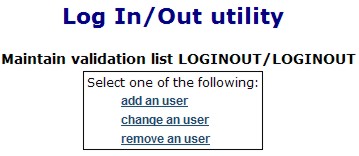
The following page shows up:
Figure U1 - Utility menu
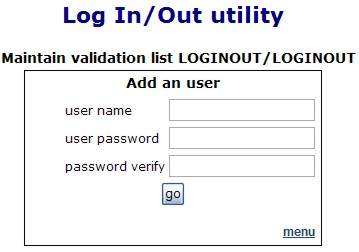
To add an user to the validation list, click add an user in Figure 1.
The following appears:
Figure U2 - Adding an user to the validation list
- User names must be unique.
- When finished adding users, click menu in the bottom right corner to return to the utility menu.
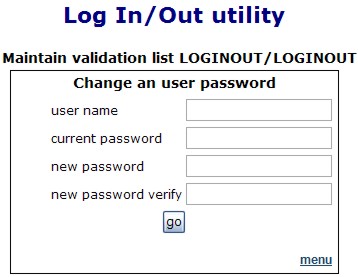
To change the password of an existing user, click change an user in Figure 1.
Figure U3 - Changing an user password
- You must know the current password of an user to change it.
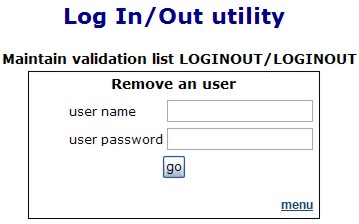
To remove an existing user from the validation list, click remove an user in Figure 1.
Figure U4 - Removing an user
- You must know the current password of an user to remove it.
|